v1.3.78-0
| 8 | : | St | t | . | ;. | %8 | ; | ;. | |||||||||||||||||||||||||||||||||||||||||||||||||||||||||||||||||||||||||||||||||||||||||
| @ | S | . | %. | ; | . | 8 | . | . | 8 | @ | |||||||||||||||||||||||||||||||||||||||||||||||||||||||||||||||||||||||||||||||||||||||
| ; | @ | @ | @ | ; | t | ; | . | t | 8 | : | . | . | |||||||||||||||||||||||||||||||||||||||||||||||||||||||||||||||||||||||||||||||||||||
| 8 | ; | . | . | : | @ | X | X | . | . | . | % | . | .X | X | ;. | ||||||||||||||||||||||||||||||||||||||||||||||||||||||||||||||||||||||||||||||||||
| . | X | . | . | . | . | : | 8 | . | . | S | ; | @ | S | ; | |||||||||||||||||||||||||||||||||||||||||||||||||||||||||||||||||||||||||||||||||||
| 8 | 8 | . | . | . | ; | . | S | . | 8 | :: | S | . | . | .: | 8 | ||||||||||||||||||||||||||||||||||||||||||||||||||||||||||||||||||||||||||||||||||
| : | . | . | @ | : | . | S | S. | X | . | ; | 8 | ||||||||||||||||||||||||||||||||||||||||||||||||||||||||||||||||||||||||||||||||||||||
| . | . | . | % | X | S | . | . | . | ; | t | ; | . | . | .. | 8 | ||||||||||||||||||||||||||||||||||||||||||||||||||||||||||||||||||||||||||||||||||
| S | : | . | . | . | : | : | 8 | . | 8 | t | X | . | . | . | .. | X | . | @ | :. | ||||||||||||||||||||||||||||||||||||||||||||||||||||||||||||||||||||||||||||||
| . | X | . | 8 | . | ; | . | . | . | . | : | 8 | . | 8 | :.; | S | t | |||||||||||||||||||||||||||||||||||||||||||||||||||||||||||||||||||||||||||||||||
| 8 | . | . | . | . | S | . | 8 | . | .@ | ;: | S | .; | 8.. | X | . | . | 8 | ||||||||||||||||||||||||||||||||||||||||||||||||||||||||||||||||||||||||||||||||
| . | % | . | X | S | S | . | . | . | ; | 8 | . | . | . | .. | 8 | . | S | ||||||||||||||||||||||||||||||||||||||||||||||||||||||||||||||||||||||||||||||||
| t | ; | . | . | .. | S | t | S. | . | . | @ | : | . | X | . | t | ; | . | 8 | |||||||||||||||||||||||||||||||||||||||||||||||||||||||||||||||||||||||||||||||
| . | X | . | @ | . | . | % | .: | 8 | . | . | S | ..; | S | . | ;. | ||||||||||||||||||||||||||||||||||||||||||||||||||||||||||||||||||||||||||||||||||
| X | X. | t | . | . | . | 8 | . | . | X | .. | : | . | S | @ | : | @ | . | . | : | t:.; | 8 | :. | |||||||||||||||||||||||||||||||||||||||||||||||||||||||||||||||||||||||||||
| X | :8 | : | . | . | . | 8 | ; | . | . | . | . | t | @. | 8 | . | . | . | : | X | % | . | X | ... | % | S | ;8 | ; | : | |||||||||||||||||||||||||||||||||||||||||||||||||||||||||||||||||||||
| S | 8 | 8 | . | t | 8 | 8 | ; | . | . | S | : | . | X | . | . | . | . | 8 | . | ..: | % | ||||||||||||||||||||||||||||||||||||||||||||||||||||||||||||||||||||||||||||
| X | . | . | . | . | ; | 8 | . | . | . | X | X | t | . | . | . | . | 8 | ; | 8 | :. | ; | ; | X | X | S | S | |||||||||||||||||||||||||||||||||||||||||||||||||||||||||||||||||||||||
| 8 | t | . | . | . | . | . | X | . | . | . | . | ; | .. | @ | . | . | 8 | :.: | 8. | . | . | t | 8. | 8 | S | . | . | % | S | :t | @ | :. | |||||||||||||||||||||||||||||||||||||||||||||||||||||||||||||||||
| . | 8 | . | . | . | . | . | % | . | X | . | . | . | % | S | @ | . | : | 8 | . | ; | . | . | . | 8 | . | 8 | : | @ | X | X | |||||||||||||||||||||||||||||||||||||||||||||||||||||||||||||||||||
| : | : | . | . | . | . | .% | X | X | ; | . | ; | X | : | : | . | . | . | .. | X | . | . | . | 8 | X | . | . | ; | . | . | t | : | . | |||||||||||||||||||||||||||||||||||||||||||||||||||||||||||||||||
| S | 8 | . | . | . | . | . | . | . | : | S | S | . | . | :8 | t | . | : | :. | t | t | . | t | . | .@ | ;. | 8 | . | . | .t | 8 | |||||||||||||||||||||||||||||||||||||||||||||||||||||||||||||||||||
| . | % | . | . | . | 8 | . | t | . | . | . | .: | 8 | . | . | X | :.X | X | . | .@ | ;:. | 8 | ; | . | . | : | X | . | t | ; | . | |||||||||||||||||||||||||||||||||||||||||||||||||||||||||||||||||||
| @ | . | . | . | . | . | . | . | : | . | 8 | . | . | 8 | :. | . | . | % | 8.. | S | . | .. | % | : | 8 | . | .. | @ | S | . | . | % | ||||||||||||||||||||||||||||||||||||||||||||||||||||||||||||||||||
| 8 | : | . | . | . | . | . | S | S | S | : | . | .: | 8 | . | . | . | 8 | . | 8 | . | . | : | .. | . | @ | . | 8 | :. | : | ; | |||||||||||||||||||||||||||||||||||||||||||||||||||||||||||||||||||
| % | . | . | . | . | ; | X | X | S | . | . | . | X | . | . | . | 8 | % | t | . | t | . | S | . | 8 | ;:. | 8 | . | % | 8. | . | : | . | S | ||||||||||||||||||||||||||||||||||||||||||||||||||||||||||||||||
| % | . | . | . | . | % | . | S | . | ; | .X | X | . | t | . | @ | X | . | 8 | ;. | X | : | . | % | 8.. | . | : | . | . | ; | 8 | . | t | |||||||||||||||||||||||||||||||||||||||||||||||||||||||||||||||||
| 8 | . | . | . | . | . | . | . | : | S | . | . | X | .. | ; | . | @ | ;:. | @ | . | : | @ | ..S | S | . | . | . | 8 | t | 8 | . | S | : | 8 | ||||||||||||||||||||||||||||||||||||||||||||||||||||||||||||||||
| ; | : | . | . | . | . | 8 | : | . | t | 8. | X | . | . | : | % | % | . | . | ... | t | . | @ | : | 8 | . | . | ; | . | X | S | |||||||||||||||||||||||||||||||||||||||||||||||||||||||||||||||||||
| X | . | . | . | . | . | . | t | 8 | @ | ; | . | .. | ; | X | . | . | . | . | ; | ... | 8 | . | ; | . | . | @ | S | . | S | . | : | ||||||||||||||||||||||||||||||||||||||||||||||||||||||||||||||||||
| t | . | . | . | : | ; | @ | . | . | 8 | t | ; | . | . | . | : | . | 8 | : | . | @ | :.. | % | t | . | X | S | . | : | 8 | 8 | . | 8 | |||||||||||||||||||||||||||||||||||||||||||||||||||||||||||||||||
| .: | @ | . | . | . | . | . | 8 | . | t | .. | S | . | .8 | :.S | 8 | . | % | 8. | S | X | .. | ; | S | . | . | S | ; | ; | . | . | X | ||||||||||||||||||||||||||||||||||||||||||||||||||||||||||||||||||
| 8 | . | . | . | % | . | @ | . | . | .8 | ;. | S | . | ; | 8 | . | : | . | . | ; | . | 8 | . | . | X | X | X | . | t | 8 | % | . | . | @ | ||||||||||||||||||||||||||||||||||||||||||||||||||||||||||||||||
| ; | :. | . | . | . | % | @ | t | ; | . | : | @ | . | . | . | . | . | 8 | . | . | . | 8 | t | . | . | t | . | @ | . | . | 8 | . | . | |||||||||||||||||||||||||||||||||||||||||||||||||||||||||||||||||
| .. | . | . | . | . | : | t | ; | @ | . | . | : | 8 | t | . | % | . | ; | ; | . | ; | . | 8 | ;: | 8 | . | .t | 8. | : | . | . | % | X | |||||||||||||||||||||||||||||||||||||||||||||||||||||||||||||||||
| 8 | . | . | . | X | . | ; | . | . | % | .t | X. | . | . | X | ..X | X | . | @ | ;: | 8 | : | .t | 8 | . | . | S | . | ; | X | ||||||||||||||||||||||||||||||||||||||||||||||||||||||||||||||||||||
| X | . | . | . | : | 8 | . | . | . | 8 | ;: | . | S | S.. | % | . | . | . | t | ; | S. | . | . | @ | t. | . | S | 8 | : | . | ; | ; | ||||||||||||||||||||||||||||||||||||||||||||||||||||||||||||||||||
| S | : | . | .8 | ; | ; | : | ; | @ | . | X | . | . | . | . | ; | @ | . | . | X | . | : | . | t | . | . | S | . | S | .. | S | X | . | 8 | 8 | |||||||||||||||||||||||||||||||||||||||||||||||||||||||||||||||
| X | 8 | . | ; | 8 | 8 | S | . | . | .. | t | ; | . | X | . | . | . | . | . | 8 | . | . | . | S | .. | t | . | .S | X. | . | ; | . | : | :. | ||||||||||||||||||||||||||||||||||||||||||||||||||||||||||||||||
| . | S | % | . | . | : | 8 | . | X | ; | X | . | . | . | 8 | t | . | 8 | ;. | ; | : | % | @ | . | : | S | 8 | . | . | X | % | . | ||||||||||||||||||||||||||||||||||||||||||||||||||||||||||||||||||
| . | S | 8 | S | . | ; | . | X | :. | ; | . | X | ;:; | 8. | . | t | 8 | . | t | % | . | . | 8 | t | . | . | 8 | : | : | . | . | ; | ||||||||||||||||||||||||||||||||||||||||||||||||||||||||||||||||||
| . | 88 | : | . | @ | S. | 8 | . | . | .. | % | . | . | . | % | . | 8 | % | 8 | X | 8 | ; | S | |||||||||||||||||||||||||||||||||||||||||||||||||||||||||||||||||||||||||||
| . | 8: | 8; | . | . | % | : | . | . | . | S | S | . | . | S | 8 | . | . | . | t | . | . | . | 8 | .. | t:.. | ||||||||||||||||||||||||||||||||||||||||||||||||||||||||||||||||||||||||
| . | ;8888 | t | 8 | 8888888 | @ | 888 | 8 | 88888. | 88888888:. | .8888888;:. | .:... | ||||||||||||||||||||||||||||||||||||||||||||||||||||||||||||||||||||||||||||||||||||||
| .... | .. | ... | ..... | ........ | ....... | . | |||||||||||||||||||||||||||||||||||||||||||||||||||||||||||||||||||||||||||||||||||||||||||
Get started: install command generator · apt repo · view reward history · blog · community
Full eligibility rules below. Network statistics at /stats.

Skywire Reward Eligibility Rules
We have transitioned to a new system with daily reward distribution
- The rules in this article may change at any time, depending on if there are problems
- We will attempt to address any issues reported via @skywire Telegram channel
- Reward corrections are not possible after the rewards for a day have been distributed.
The required minimum Skywire version will be incremented periodically.
Introduction
All information about rewards will be published here. Please ask for clarification in the @skywire Telegram channel if some things appear to not be covered.
Please join @SkywirePSA for public service announcements (PSA) regarding the skywire network, update notices, changes to this article, etc.
Reward distribution notifications are on telegram @skywire_reward.
Information about reward distribution as well as other metrics for the skywire network can be found at theskywirenetwork.net
Reward Pools
816000 Skycoin are distributed annually to those visors which meet the minimum uptime and the other requirements listed below, in two equally sized reward pools.
A total of up to ~1117.808 Skycoin per pool are distributed daily in non leap-years.
A total of up to ~1114.754 Skycoin per pool are distributed daily in leap-years.
Pool 1: Presence
The presence pool reward for a day is evenly divided among all eligible visors on the basis of having met uptime and other requirements for the previous day, with IP and MAC address deduplication applied. All architectures are eligible for the presence pool.
Regional saturation scaling is applied to the presence pool to promote geographic diversity. See Regional Saturation Scaling for details.
Pool 2: Bandwidth
The bandwidth pool reward for a day is distributed based on the amount of transport bandwidth each visor sent during the previous day — sender-pays. A visor accrues bandwidth credit for the bytes it transmitted on each transport, with its per-edge sent counter capped by the counterparty's reported recv so a one-sided inflation cannot pump credit. Only visors whose sender-side total exceeds a minimum threshold are eligible for the bandwidth pool.
The pool is divided using a square-root scaling of sent bytes — analogous to how regional saturation scales the presence pool, but applied to bandwidth amount instead of country IP count:
visor_weight = sent_bytes ^ bandwidth_exponent (default 0.5)
visor_share = visor_weight / sum(all visor_weights)
visor_reward = visor_share * pool_2_budget
With the default exponent of 0.5, a 100× bandwidth lead over another sender produces only a ~10× share advantage. This prevents any single high-throughput visor from dominating the pool while still rewarding heavier senders more than lighter ones. Setting the exponent to 1.0 reverts to strict bytes-proportional distribution; 0 weights every qualifying sender equally.
Each transport edge is evaluated independently: a visor earns bandwidth credit for what it sent regardless of whether the counterparty is also reward-eligible. Credit only flows to the sender, so an ineligible peer was never going to receive a share — its eligibility is not checked.
Visors which do not meet the minimum bandwidth threshold will still receive rewards from the presence pool, but will not receive any share of the bandwidth pool. In practice the effective floor is also bounded by Skycoin's 6-decimal precision: any visor whose share of the day's bandwidth pool would round to less than 0.000001 SKY receives nothing for the day, even if its sent bytes cleared the configured minimum threshold.
The bandwidth considered for this pool excludes same-LAN transports (where both edges share the same external IP address).
Rules & Requirements
To receive Skycoin rewards for running skywire, the following requirements must be met:
-
1) Minimum skywire version — see the Version section for the schedule of version requirement updates (currently v1.3.59 as of 06-10-2026)
-
2) 75% uptime per day minimum is required to be eligible to receive rewards
-
3) Visors must be running on the skywire production deployment with a config that is updated on every version. No default keys or addresses of this configuration may be removed - but you can add keys where applicable.
-
4) Only 1 (one) visor per machine - virtual machines are ineligible
-
5) Up to 8 (eight) visors may each receive 1 (one) reward share per location (ip address) - with 8 shares divided between all visors at that ip address which achieved the minimum uptime. (Temporary exception: for the month of June 2026 only, the per-IP cap is raised to 12 shares — see Per IP Limit for the rationale; the cap auto-reverts to 8 on 2026-07-01.)
-
6) A valid skycoin address must be set for the visor
-
7) The visor must be connected to the DMSG network
-
8) Transports can be established to the visor
-
9) The visor has at least 2 Transports observed at some point during the same period as uptime (checked hourly)
-
10) The visor responds to Transport Setup-Node requests
-
11) The visor can have routes established to it & responds to pings over routes
-
12) The visor reports transport bandwidth to the transport discovery on transport re-registration - the basis for bandwidth-based rewards
-
13) The visor produces a survey when queried over dmsg by any keys in the survey_whitelist array by default
Deployment Changes and the dmsghttp-config
The dmsghttp-config is the default — and currently the only supported — visor config. It is generated automatically via:
skywire cli config gen -b --bestproto
In order to bootstrap the visor's connection to the dmsg network (via TCP connection to an individual dmsg server), the dmsghttp-config.json is provided with the skywire binary release. All production deployment services are then reached by the visor over the dmsg network.
In the instance that the skywire production deployment changes — specifically the dmsg servers:
-
it will be necessary to update to the next version or package release which ships an updated dmsghttp-config.json,
OR
-
it will be necessary to manually update the dmsghttp-config.json provided by your skywire installation.
Currently, there is no mechanism for updating the dmsghttp-config.json which does not require an http request — a request which may be blocked depending on region.
If the visor cannot reach any of the dmsg servers listed in its dmsghttp-config.json, it will not connect to the dmsg network. The reward system will then be unable to collect the visor's survey, and the visor will not accumulate uptime — both prerequisites for reward eligibility.
As a consequence: visors in regions where http requests are blocked (e.g. China) may need the latest release of the package rather than only the latest binary, unless the dmsghttp-config.json is updated manually within the installation.
Verifying Requirements & Eligibility
1) Version
View the version of skywire you are running with:
skywire cli -v
skywire visor -v
NOTE: the uptime tracker and other services consider the visor's config version - not the actual binary version.
It is expected that the visor's config is re-generated on every update in order to include any config changes which may have been introduced
The update deadlines specify the version of software required as of (i.e. on or before) the specified date in order to maintain reward eligibility:
Reward eligibility after 02-01-2026 requires Skywire v1.3.33
Requirement established 01-04-2026
Rewards Cutoff date for updating 02-01-2026
Reward eligibility after 02-25-2026 requires Skywire v1.3.34
Requirement established 02-10-2026
Rewards Cutoff date for updating 02-25-2026
Reward eligibility after 03-20-2026 requires Skywire v1.3.36
Requirement established 03-06-2026
Rewards Cutoff date for updating 03-20-2026
Reward eligibility after 04-18-2026 requires Skywire v1.3.40
Requirement established 04-04-2026
Rewards Cutoff date for updating 04-18-2026
Reward eligibility after 04-19-2026 requires Skywire v1.3.41
Requirement established 04-05-2026
Rewards Cutoff date for updating 04-19-2026
Reward eligibility after 04-23-2026 requires Skywire v1.3.42
Requirement established 04-09-2026
Rewards Cutoff date for updating 04-23-2026
Reward eligibility after 04-23-2026 requires Skywire v1.3.43
Requirement established 04-09-2026
Rewards Cutoff date for updating 04-23-2026
Reward eligibility after 05-09-2026 requires Skywire v1.3.47
Requirement established 04-25-2026
Rewards Cutoff date for updating 05-09-2026
Reward eligibility after 05-22-2026 requires Skywire v1.3.50
Requirement established 05-08-2026
Rewards Cutoff date for updating 05-22-2026
Reward eligibility after 06-10-2026 requires Skywire v1.3.59
Requirement established 05-27-2026
Rewards Cutoff date for updating 06-10-2026
Uptime
Each visor heartbeats every 5 minutes; the heartbeats (and transport registrations) populate the same underlying uptime data that feeds the rewards pipeline.
The rewards system reads from the transport-discovery integrated uptime tracker. The same data shape is served by three deployment services:
| Service | Host |
|---|---|
| Transport-discovery (used by rewards) | tpd.skywire.skycoin.com |
| DMSG-discovery | dmsgd.skywire.skycoin.com |
| Service-discovery | sd.skycoin.com |
Querying these endpoints directly over plain HTTP is discouraged and will be deprecated. Use the skywire cli ut subcommands, which fetch over the deployment's DMSG path and cache the response locally:
skywire-cli ut tpd # transport-discovery (rewards source)
skywire-cli ut mdisc # dmsg-discovery
skywire-cli ut sd # service-discovery
Check uptime for a specific visor (any subcommand works the same way):
skywire cli ut tpd -k <public-key>
For your locally-running visor:
skywire cli ut tpd -k $(skywire cli visor pk)
The default response is v2 ({ pk, on, version, daily: {YYYY-MM-DD: "pct"} }). Pass -T / --timeline for v3, which adds a per-5-minute bitmap rendered as 24 hourly blocks.
Additional useful flags (run skywire cli ut tpd --help for the full list):
-n / --min-daily N— only visors whose worst daily uptime is ≥ N percent--min-version vX.Y.Z— only visors at that version or newer-d / --days N— include the N most-recent days (default: latest only)--date YYYY-MM-DD— only include data for a specific day-l / --list-versions— show the PK→version distribution
Example v2 output for two visors:
[
{
"pk": "02001319d25a66609b64cc389bd0dcee6d5b4ab93bd139186c47d1d6cbe955e7e1",
"on": false,
"version": "v1.3.30",
"daily": {
"2025-01-03": "86.11",
"2025-01-05": "88.89",
"2025-01-06": "100.00",
"2025-01-07": "100.00",
"2025-01-08": "87.15"
}
},
{
"pk": "02006214d489aee383dc14dea22d1c308a547520f545b914c1e476a7a87064e77b",
"on": true,
"version": "v1.3.30",
"daily": {
"2025-01-03": "100.00",
"2025-01-04": "100.00",
"2025-01-05": "100.00",
"2025-01-06": "100.00",
"2025-01-07": "95.14",
"2025-01-08": "99.65",
"2025-01-09": "71.18"
}
}
]
Architecture
All computer hardware and architectures are eligible for both reward pools.
Deployment
The deployment your visor is running on can be verified by comparing the services configured in the visor's .json config against conf.skywire.skycoin.com
cat /opt/skywire/skywire.json
The service configuration will be automatically updated any time a config is generated or regenerated.
Compare the dmsghttp-config of your current installation with the dmsghttp-config on the develop branch of github.com/skycoin/skywire — the dmsghttp-config is the default config and is used by every visor on the production deployment.
The same data in a different format should be displayed in the dmsg-discovery all_servers page. Ensure that the dmsghttp-config.json in your installation has the same ip addresses and ports for the dmsg server keys.
The data from the dmsg discovery should be considered authoritative or current.
Per Machine Limit
Virtual machines are not eligible for rewards, as there is no way to limit the number of instances of skywire running on the same machine if they are running in virtual machines.
The visor is determined to be running on a virtual machine if a hypervisor is listed in it's survey such as kvm, xenhvm, or hyperv - (not to be confused with a skywire hypervisor)
Multiple instances of skywire which are otherwise determined to be running on the same machine (via their mac address) will have one reward share divided between all the skycoin reward addresses which are set for those visors.
Per IP Limit
A maximum of 8 reward shares per ip address is divided between all visors which made uptime at a given ip address.
For example, if 9 visors at a given ip address meet the minimum uptime requirement, the reward share for each visor will be 8/9ths of a share (~~0.8888) which sum to a total of ~~7.99999 shares.
Temporary exception — June 2026 only: the per-IP cap is raised from 8 to 12 shares for calc dates within June 2026 (UTC). Rationale: a specific operator was unable to relocate excess visors off a single IP address because OS-level update infrastructure was blocked by ongoing bandwidth-pool issues this month, and several boards in their official miner died reducing the visor count to 11+1 at one location. The cap reverts automatically to 8 on 2026-07-01 with no further action required.
Regional Saturation Scaling
To incentivize geographic diversity of the skywire network, a regional saturation scaling factor is applied to each visor's presence share. The factor is a per-visor multiplier (not a country-pot allocation) and depends only on the number of unique IP addresses in the visor's country.
For each qualifying visor:
visor.share *= unique_ips_in_country ^ (exponent - 1)
The default exponent is 0.5, so each visor's per-country scale is 1/sqrt(unique_ips_in_country). After scaling, all per-visor shares are renormalized to the daily presence pool.
This means:
- A country's total reward grows linearly with the number of qualifying visors (subject to the per-IP cap), so adding visors 2..cap at an existing IP does not dilute the rewards of existing visors at that IP
- The per-visor reward in a country shrinks as that country accumulates more unique IPs — single-IP countries see the highest per-visor reward, providing a growth incentive in under-represented regions
- No country is excluded from rewards — all eligible visors receive rewards regardless of location
Example: If Country A has 100 unique IPs and Country B has 1 unique IP, at the default exponent 0.5:
- Country A's per-visor scale:
100^(0.5-1) = 100^(-0.5) = 0.1 - Country B's per-visor scale:
1^(0.5-1) = 1.0 - Country B's single visor is worth approximately 10× more (per-visor) than each visor in Country A
The geographic location of each visor is determined by GeoIP lookup of the visor's IP address using the embedded MaxMind GeoLite2-City database at the country level.
The exponent can be adjusted via the --sat-exp flag (default 0.5):
1.0disables regional saturation scaling entirely (all visors have the same per-country scale of 1)0.5(default) gives1/sqrt(N)scaling — balances the diversity incentive against runaway per-visor extremes- Lower exponents (e.g. 0.4) strengthen the discount on dense-IP countries; higher exponents (e.g. 0.7) soften it
Skycoin Address
The skycoin address to be rewarded can be set from the cli:
skywire cli reward <skycoin-address>
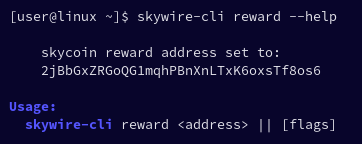
$ skywire cli reward --help
reward address setting
Sets the skycoin reward address for the visor.
The config is written to the root of the default local directory
this config is served via dmsghttp along with transport logs
and the system hardware survey for automating reward distribution
Flags:
--all show all flags
$ skywire cli reward 2jBbGxZRGoQG1mqhPBnXnLTxK6oxsTf8os6
Reward address:
2jBbGxZRGoQG1mqhPBnXnLTxK6oxsTf8os6
$ skywire cli reward --help
skycoin reward address set to:
2jBbGxZRGoQG1mqhPBnXnLTxK6oxsTf8os6
Flags:
--all show all flags
or via the hypervisor UI.
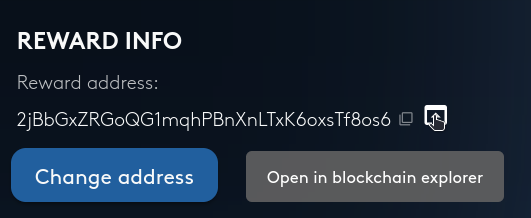
the example above shows the genesis address for the skycoin blockchain. Please do not use the genesis address.
It is highly recommended to set the reward address in the file '/etc/skywire.conf' by adding this line to the file:
echo "REWARDSKYADDR=('2jBbGxZRGoQG1mqhPBnXnLTxK6oxsTf8os6')" | sudo tee -a /etc/skywire.conf
PLEASE DO NOT USE THE GENESIS ADDRESS!
Add your skycoin address there and run:
skywire-autoconfig
on linux (assumes you have installed the package)
If this file does not exist for you, it can be created with
skywire cli config gen -q | sudo tee /etc/skywire.conf
If you do this, YOU MUST UNCOMMENT THE FOLLOWING LINES OF THE FILE:
PKGENV=true
BESTPROTO=TRUE
you can open the file in an editor to make that change, for instance nano
sudo nano /etc/skywire.conf
Connection To DMSG Network
For any given visor, the system hardware survey and transport setup-node survey are collected hourly by the reward system over dmsg.
This can be verified by examining the visor's logging:
[DMSGHTTP] 2024/10/09 - 22:31:45 | 200 | 47.2µs | | 03714c8bdaee0fb48f47babbc47c33e1880752b6620317c9d56b30f3b0ff58a9c3:51405 | GET /health
[DMSGHTTP] 2024/10/09 - 22:31:46 | 200 | 193.325µs | | 03714c8bdaee0fb48f47babbc47c33e1880752b6620317c9d56b30f3b0ff58a9c3:51457 | GET /node-info
Bandwidth data is reported separately by each visor to the transport discovery on transport re-registration — it is no longer collected from the visor over dmsg as a per-day CSV. See Transport Bandwidth and Metrics.
The collected surveys should be visible in the survey index here:
theskywirenetwork.net/log-collection/tree
An example of one such entry:
├─┬025e3e4e324a3ac2771e32b798ca3d8859e585ac36938b15a31d20982de6aa31fc
│ ├──health.json Age: 13m5s {"build_info":{"version":"v1.3.21","commit":"5131943","date":"2024-04-13T15:03:26Z"},"started_at":"2024-05-07T08:52:09.895919222Z"}
│ ├──node-info.json "v1.3.21"
│ └──tp.json Age: 6m56s []
Note: the system survey (node-info.json) will only exist if the reward address is set.
If your visor is not generating such logging or errors are indicated, please reach out to us on telegram @skywire for assistance
Transportable
It is not required that a visor run any service, such as a vpn or socks5 proxy server, which permits direct access to the internet from your ip address. However, it is required that the visor is able to act as a hop along a route. A module is active at runtime which checks that transports may be established to that visor - the visor creates a dmsg transport to itself every few minutes to ensure transportability. If it's not possible to create a dmsg transport to the same visor after three attempts,the visor will shut down automatically. It is expected that the visor will be restarted by a process control mechanism if the visor shuts down for any reason. In the officially supported linux packages, systemd will restart the visor if it stops; regardless of the exit status of the process.
Transports
To be useful for routing traffic, a visor must have a minimum of 2 transports, observed at some point during which the uptime is being considered.
Note that this requirement depends on at least 2 public visors being online on the network at all times, and that your visor is running with public autoconnect logic enabled (which is the default).
in the instance that the visor does not have transports, it is recommended to manually create transports to the two public visors with the most transports, which can be observed with:
skywire cli pv -t
Transport Setup Node
The visor must respond to transport setup-node requests. The transport setup-nodes configured for the visor are included in the survey and verified as an eligibility requirement for rewards.
Routes are established through the network via setup-nodes. When a setup-node contacts your visor to establish a route, the visor must accept and process the request. Visors which do not have the correct setup-nodes configured, or which are unable to respond to setup-node requests, are not eligible for rewards.
Routability and Ping Latency
The visor must be route-able over existing transports and respond to pings. There is no minimum latency requirement, as the measurement is relative to where it is being measured from.
Transport latency is measured automatically when transports are established. If the initial measurement fails (e.g., due to a busy remote visor), the visor will retry with exponential backoff until a measurement succeeds or the transport is closed. Latency data is reported to the transport discovery service on transport re-registration.
Transport Bandwidth and Metrics
Transport bandwidth and latency metrics are collected by the transport discovery service. Each visor maintains per-transport bandwidth counters in a local bbolt-backed stats store and reports them when transports are re-registered with the transport discovery. (The on-disk YYYY-MM-DD.csv per-day log store the visor used to keep — and the reward system used to fetch over dmsg — has been retired; historical data is served from the same bbolt store via the visor's RPC.) These metrics can be viewed with:
skywire cli tp metrics
skywire cli tp metrics -t
skywire cli tp metrics --tree
The bandwidth data from the transport discovery is used for the bandwidth pool reward distribution under a sender-pays model: each visor is credited only for the bytes it sent on each transport, and each side's sent counter is capped by the counterparty's reported recv (verified bandwidth). This sender-side cap prevents any single visor from unilaterally inflating its own bandwidth figures.
Survey
On setting the skycoin reward address, the visor will generate and serve a system survey over dmsg.
Only keys which are whitelisted in the survey_whitelist array of the visor's config will have access to collect the survey.
To print the survey (approximately) as it would be served, one can use:
skywire cli survey -p
The purpose of the survey is strictly for checking eligibility requirements numbers 3 through 7.
Setting a skycoin address is considered as consent for collecting the survey ; the survey is not generated unless you set a skycoin address
We respect your privacy.
Verifying Other Requirements
If the visor is not able to meet the eligibility requirements numbers 8 through 13, that is usually not the fault of the user nor is it something the user is expected to troubleshoot on their own at this time. Please ask for assistance on telegram @skywire
Reward System Overview
The skycoin reward address may be set for each visor.
The skycoin reward address is in a text file contained in the "local" folder (local_path in the skywire config file) i.e local/reward.txt.
The skycoin reward address is also included with the system hardware survey and served via dmsghttp.
The system survey ('local/node-info.json') is fetched hourly by the reward system via
skywire cli log
The index of the collected files may be viewed at theskywirenetwork.net/log-collection/tree
Once collected from the nodes, the surveys for those visors which met uptime are checked to verify hardware and other requirements, etc.
The system survey is only made available to those keys which are whitelisted for survey collection, but is additionally available to any hypervisor or dmsgpty_whitelist keys set in the config for a given visor.
Setting a skycoin address is considered as consent for collecting the survey.
The public keys which require to be whitelisted in order to collect the surveys, for the purpose of reward eligibility verification, should populate in the visor's config automatically when the config is generated.
Reward System Funding & Distributions
The reward system is funded on a monthly basis. Sometimes there are unexpected or unavoidable delays in the funding. In these instances, rewards will be distributed based on the data generated when the system is funded. In some instances, it's necessary to discard previous reward data and do multiple distributions to handle backlog of reward system funds.
We do our best to ensure fair reward distribution - but the system itself is not infinitely flexible. If there is no good way to rectify historical or undistributed rewards backlog, it will be distributed going forward as multiple distributions on the same day to those current active participants in the network.
Deployment Outages
While we do our best to maintain the skywire production deployment, there have been instances of issues or outages in the past. We attempt to correct these outages as soon as possible and avoid recurrent disruptions.
The policy for handling rewards in the instance of a deployment outage is to repeat the distribution for the last day where uptime was unaffected by the outage; for the duration of the outage.
Hardware
Skywire rewards are open to all computer hardware and architectures.
If there is not a release for your desired architecture, we can attempt to add it, on request.